Key Takeaways
- AI browsers facilitate smart browsing by understanding users’ intent, answering queries, and performing tasks independently.
- They shift the navigation paradigm from clicking links to asking questions and getting instant & summarized responses.
- Instant answers, content summarization, multi-step task automation, and conversational navigation are some capabilities of intelligent browsers.
- Their core benefits include faster decision-making, improved research efficiency, personalized experiences, and automation-driven workflows.
- Businesses can prepare for AI browsers by improving content structure, semantics, and machine readability.
- In the future, AI browsers will become standard, pushing the web toward conversational interfaces, autonomous agents, and AI-first content consumption.
For decades, web browsers have been simple gateways that enabled us to run searches or get answers to our queries. We typed queries, and they displayed information- simple, right? What they have never done is to understand the actual intent, or not having users juggle through multiple tabs.
That era is over! With artificial intelligence entering our browsing windows, web browsers are not mere gateways. In fact, they have become so intelligent that they can do everything, from compiling and researching to booking reservations and filling out forms, all on their own.
We are referring to the era of AI browsers that are taking the world by storm. Whether it is Perplexity’s Comet, OpenAI’s ChatGPT Atlas, or the AI copilots that are now being integrated into Chrome and Edge, the browser has evolved from a passive tool to a smart collaborator.
But what exactly is an AI browser, how does it work, how is it different from the traditional browsers we all have been using for ages, or what are its features? This AI browser comprehensive guide provides answers to all these questions. Let’s dig deeper:
What are AI Browsers?
AI browsers are next-gen web browsers powered by advanced AI capabilities. These browsers can search, read, and complete tasks more efficiently and at an unmatched speed. Rather than just displaying webpages against the queries, Agentic AI browsers like Comet comprehend your intent, process information in real-time, and deliver ready-to-use insights.
To better understand AI browsers, let’s take a look at this situational example:
You want to buy a pair of sneakers or running shoes, and you open a browser to put a query for the same. Now, as soon as you run the query:
A traditional browser will display multiple results, which you have to go through manually to look at the options and compare the pricing of the shoes.
In an AI browser, all you have to do is run a query like “find the best running shoes for jogging under the budget of 10K” or simply “find the best running shoes under 10K in black color.” That’s it! That’s all you have to do.
The browser will automatically search for the same on top e-commerce websites, check reviews and ratings, and display you a shortlist with pros, cons, prices, and links to buy.
In short, instead of spending hours browsing through multiple websites or links, an artificial intelligence-powered browser will show you tailored results or recommendations for quick decision-making.
Similar Read: A Comprehensive Guide to Agentic Web
Traditional Web Browsers Vs. AI Browsers
| Aspect | Traditional Web Browsers | AI Browsers |
| Core Function | It displays web pages through which a user has to navigate manually. | AI browsers can understand intent, process information, and deliver compiled results. |
| Search Experience | Delivers keyword-based search results. | It offers conversational search with concise and contextual responses. |
| Information Consumption | Traditional browsers require users to go through multiple links to extract insights. | AI browsers automatically summarize or highlight key points or insights. |
| Navigation Style | This involves heavy multitasking with multiple tabs. | When you browse in Agentic AI browsers, it can compile and present only the required information. |
| Task Handling | It is limited to browsing; the user does the required job. | AI browsers can autonomously do research, compare, draft, and perform other basic tasks to save your browsing time and effort. |
| Personalization | It personalizes basic preferences and browsing history. | Artificial intelligence browsers learn user patterns and deliver highly personalized results. |
| Decision Support | In this, a user has to manually evaluate sources. | AI compares products, reviews, prices, and insights in real-time. |
| Efficiency | Browsing in this browser is time-consuming as a user has to switch between different pages. | Browsing is quite fast as the browser has guided workflows and performs basic functions on its own. |
| Content Interaction | It displays a static view of web pages. | AI browsers offer dynamic interpretation, summaries, and interactive answers. |
| User Role | It relies on user-driven navigation. | AI browsers facilitate AI-assisted browsing and execution of tasks. |
You might be interested in: AI Avatar vs Digital Human: Comparing Features, Working, Use Cases, and More
How Does an AI Browser Work
Now that you have a good understanding of intelligent web browsers, it’s time to explore how they actually work. These browsers combine traditional or conventional web browsing with intelligent algorithms to understand the intent of users, process information in real time, and deliver compiled results without requiring the user to visit from one tab to another.
Step 1: A user enters a search query.
Step 2: The browser’s NLP model understands the intent, entities, and context of the query.
Step 3: The browser searches and fetches relevant pages and data against that query.
Step 4: AI filters content and extracts facts, figures, and key information.
Step 5: The browser ranks and filters the results based on relevance and trustworthiness.
Step 6: The AI model summarizes, compares, and compiles findings into a crisp response.
Step 7: The browser displays the information and goes with the optional follow-up.

Key Capabilities/Features of an AI Web Browser
Let’s delve deeper into the core capabilities or features of the AI browser:
1. Conversational Search & Query Understanding
AI browsers can understand natural-language questions and provide concise and context-aware answers to the queries. The best part is that they don’t even require the user to visit multiple websites. This accelerates decision-making.
2. Page-Level Summarization
AI browsers hold the capability to summarize long articles, emails, research articles, and website pages. They not only summarize them but also provide key insights that make a user go through them without spending too much time.
3. Context-Aware Assistance
Modern AI browsers are capable of remembering the user’s context within a session. It enables them to run follow-up queries to explore further. The browser provides answers, keeping in mind previous interactions.
4. Inline Answers & Source Comparison
Unlike traditional browsers, Agentic AI browsers don’t provide a list of links. Rather, they understand the intent of the query, extract insights from multiple sources, and assemble them in the form of a summary to offer unified answers.
5. Task Automation & Multi-Step Workflows
Advanced AI browsers have the ability to plan and auto-execute tasks such as researching a topic or creating content drafts. They can even analyze PDFs or suggest the best option from multiple sources.
6. Smart Personalization
AI models embedded in modern browsers can understand and adapt to users’ preferences and interests. They can even comprehend their reading patterns to deliver highly personalized content and results.
Benefits of AI Browsers
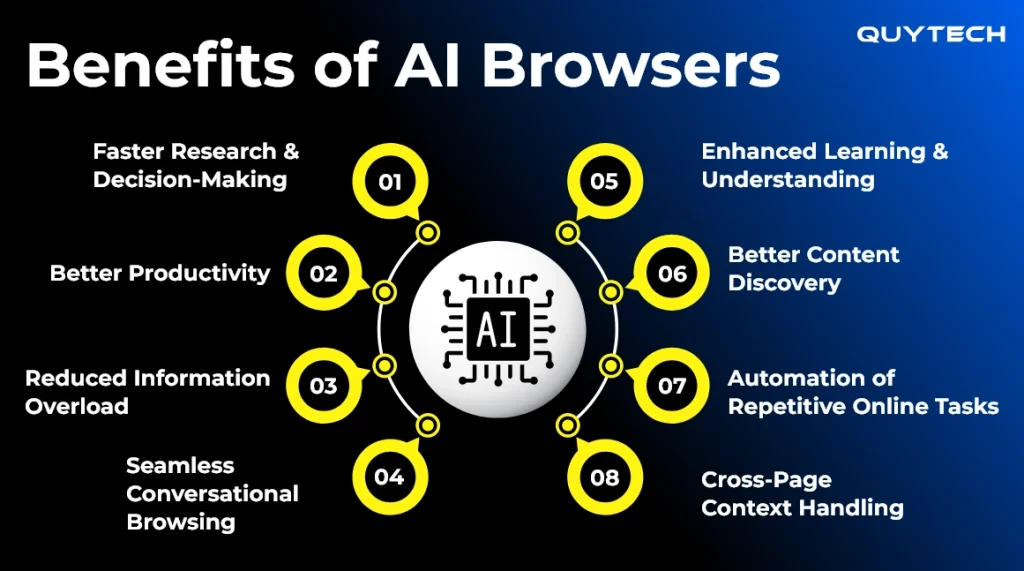
AI browsers can expedite research and decision-making while reducing information loads and ensuring seamless conversational browsing. Let’s explore these benefits in detail:
1. Faster Research and Decision-Making
AI browsers can shorten the browsing time by cutting hours of searching and tab hopping, and providing direct insights or summarized insights collected from different sources. This expedites the research process and facilitates faster decision-making.
2. Better Productivity
In a traditional scenario, a user has to go through each result from the browser’s search results or lists to compare products or find what they are looking for. In the AI browser, the browser does all this on behalf of the user. It can compare products, draft content, fill forms, and complete other tasks.
3. Reduced Information Overload
With AI browsers, users don’t have to read long pages. Based on the intent of the query and previous interactions, AI browsers highlight only what is required. It can save mental effort while keeping users focused or delivering them a great browsing experience.
4. Seamless Conversational Browsing
With artificial intelligence browsers, users can ask questions naturally, and they offer precise answers. Not just the answer to that particular question, it can even go further with follow-up questions, considering previous interactions. Another best thing is that it offers smarter personalization in the results.
5. Enhanced Learning and Understanding
Modern browsers provide instant summaries, concise definitions and explanations, and clear comparisons; this makes it easier for the user to understand even complex topics or get precise information without much effort.
6. Better Content Discovery
Another amazing benefit of the AI browser is that it picks information only from the high-quality sources that best match your intent. It is different from the traditional browsers, which may relate to the results that are SEO-optimized.
7. Automation of Repetitive Online Tasks
With AI-powered web browsers, users can expect automation of repetitive tasks, such as drafting an email, generating a report, collecting data, creating content drafts, or filling in basic information in forms. This takes browsing to a whole new level.
8. Cross-Page Context Handling
Artificial intelligence keeps track of your queries. While browsing, it can refine searches and create a smoother end-to-end workflow while you move from one topic to another. This delivers an exceptional browsing experience.

Top Technologies that Make AI Browsers What They Are
Reading merely about AI browsers, their features, and benefits is not enough; you have to have an idea of the technologies that run in the background to enable these browsers to deliver an exceptional experience. These are the components that make an ordinary browser an intelligent one:
| Technology | Description |
| 1. Large Language Models (LLMs) | Large language models like GPT, Claude, and custom domain models make the browsers capable of interpreting questions asked in human language. They also enable the browser to extract context and respond in a similar manner. |
| Natural Language Processing (NLP) | NLP further breaks down user input into intent, entity, and context. It is because of this technology that the browser can understand the intent of users’ queries. |
| Real-Time Web Crawling & Retrieval Systems | AI-powered web browsers rely on these systems to crawl through a website or web page to retrieve and review a document, article, or any other information. |
| Information Extraction & Summarization Models | With these models, the browser can condense large pages into short and meaningful insights that the user can understand without any difficulty. |
| Ranking Algorithms & Credibility Scoring | This technology enables the browser to score highly trusted and relevant sources based on the queries of the users. |
| Context Memory & Session Intelligence | With this, intelligent web browsers can track context across interactions. They can keep in mind previous interactions for a seamless conversation-style workflow. |
| Multi-Agent Systems | Multi-agent systems are a part of highly advanced AI browsers. They can perform different tasks without any manual intervention. |
How AI Browsers Change User Behaviour and Web Interaction
AI browsers have been gaining popularity for all the good reasons. It has shifted the navigation paradigm from “Click to Read” to “Ask and Get Answer.”
As aforementioned, AI browsers relieve users from opening multiple links to get the required information. They don’t have to click and read each page whose link has been displayed against the search query. Instead, the user needs to give a specific and clear input, and the browser provides a synthesized answer following an intent-driven or context-driven approach.
Top Applications of AI Browsers
Let’s take a look at the top applications or use cases of AI web browsers:
Instant Answers Without Deep Searching
An AI browser provides instant answers to users’ queries. It will provide verified answers without displaying multiple tabs. Perfect use cases would be for research, quick fact-checking, and comparison queries.
Automated Content Summarization
AI web browsers can quickly summarize long articles, documents, PDFs, and videos to display quick insights or summaries. Its use cases would be professionals scanning industry reports, students reviewing study materials, and business executives doing research tasks.
Conversational Web Browsing
Conversational web browsing is one of the amazing applications of an AI browser. With this, users interact through a chat-like interface. They enter their query into that interface, and it does the rest of the magic. Getting product recommendations, planning travel, and collecting information from multiple sources are the best use cases.
Multi-Step Research and Workflow Automation
Modern browsers with AI agents can accomplish tasks for workflow automation and save users’ time and effort. These agents can collect data from different sources, compare prices, derive insights, compile findings, and do a lot more tasks that a user using a traditional browser has to do manually.
Read further: Top 10 AI Agents in 2026 to Workflow Automation
Product Discovery
AI can understand user needs and give recommendations for the best-matched products. They are ideal for personalized shopping, comparing electronics and gadgets, and making budget-based product decisions.
Personalized Browsing and Content Curation
These browsers learn from users’ preferences and previous interactions. They can tailor results associated with news feeds, learning information, and investment.
Real-Time Translation and Localization
AI browsers have the capability to translate entire pages, chats, and documents in the preferred language. They can be best-suited for cross-border research, global business operations, and multilingual browsing.
Voice-Driven Navigation
This is another best application of AI web browsers. With this, users can browse simply by giving voice commands. They can be used for accessibility support and hands-free research, especially when using mobile devices.
You may like to explore: AI in Voice Commerce: Transforming Customer Experiences in Retail
Apart from the aforementioned applications, inline insights & annotation, secure data handling & smart privacy controls, and meeting & email intelligence integration are some other outstanding use cases of AI browsers.

Top AI Browsers that are Building the Future of the Web
Take a look at the top AI browsers that have taken the world by storm in early 2025 and are still gaining immense popularity:
Perplexity Comet
It is a modern AI browser with a built-in assistant and features like citation-backed answers, real-time summarization, and multi-source synthesis. It considers users’ queries as research rather than a mere query.
It is ideal for researchers, knowledge-workers, content teams, and basically anyone who wants quick access to credible information without manually searching.
Microsoft Edge Copilot
It’s another AI-powered browser equipped with “Copilot Mode.” The browser facilitates context-aware assistance, browsing across multiple tabs, page summarization, and content translation. It can be integrated with Windows without much effort.
Microsoft Edge Copilot is suitable for enterprise users and professionals, mainly the ones that are already using Microsoft products.
Opera One
This modern AI browser comes with built-in AI and requires no additional installation. Users can use it for summarization, chat-style assistance, and enjoy agentic capabilities during browsing.
It is ideal for those looking for an easy-to-adopt AI browsing experience; it could be casual researchers or everyday users.
How Businesses Should Prepare and Adapt for AI Browsers
Now comes the most important question. With the rise of AI browsers and an increasing user base of these intelligent browsers, what businesses need to do so that they grab the attention of users on these browsers too. In other words, in what way businesses need to prepare and adapt for this modern way of browsing. Dig deeper to know how:
Content Strategy
AI browsers prioritize content that is easy to interpret and summarize. Therefore, as a business, make sure that your website’s content is well-structured with clear headings, subheadings, bullet points, and logical sections. Also, ensure that it has semantic HTML. This will help the AI model to understand your content hierarchy. Provide a clear explanation of the technical terms and add FAQs and comparison blocks.
Follow SEO/AEO Tactics
The traditional SEO approach is good, but to make your content ready and to be preferred by AI browsers, ensure clarity, authority, and intent-match. Optimize for compound queries and create content that clearly answers users’ “whys,” “hows,” and “whats.” Make your content rich with data, evidence, statistics, and case studies.
- Make sure the technical part and design are AI-friendly
- Web pages should be machine-readable and quick to load
- Ensure consistent formatting with minimal clutter and clear typography
- Your website or web page should have well-labeled images and graphics
If you want to prepare your business for AI browsers, you can also reach out to an experienced and trusted AI development company with expertise in agentic AI, AI agents, machine learning, NLP, LLMs, and other emerging technologies.
What the Future Holds for AI Browsers
Agentic AI browsers have quite a promising future as they are moving from niche tools to become an everyday thing. In the upcoming years, we may expect rapid adoption of AI browsers by individuals and enterprises. In 2026, we may also see a shift in user expectations as more and more users will expect the browser to provide them with exact answers rather than just displaying a series of links.
Multi-tab browsing may become a thing of the past, and content consumption will go like “summary first and full reading later.” In short, the web will shift towards quality-driven, insight-rich environments where users will have to do the least and the browser will do everything.
Conclusion
AI browsers are no longer a dream; they are a reality now. These browsers have redefine how people interact with the web to search for information, find a product, or simply browse through various websites. They can be rightly considered as intelligent agents that continuously run in the background to deliver an unmatched browsing experience by understanding the intent, summarizing information, comparing option and accomplishing tasks that would otherwise require manual execution.
For users, using AI browsers means making fewer clicks and getting quick responses, and conversation-driven navigation through the web. For businesses, it is pathway to reach their audience, provided they follow the right approach and make their website AI agent-friendly. Read this guide to know everything from benefits, features, and technologies to best practices for businesses and future outlook of AI browsers.
FAQs
Yes, AI browsers follow the strict security protocols just as traditional browsers. However, it is recommended for users to verify privacy settings and ensure no AI agent can access personal and sensitive information unless allowed.
Not completely. They are actually intelligent browsers that minimize dependency on manually performing various tasks.
Definitely! An enterprise or a business can do this by integrating custom models, knowledge bases and plugins. They can reach out to an experienced AI development company like Quytech for this.
Yes. Most advanced AI browsers support voice-based queries, dictation, and hands-free browsing, improving usability across devices.
